
Download Anupama Hindi Software – Hindi text editor, AI-powered typing, Unicode conversion, professional Hindi typing tool, legal dictionary, font converter, efficient Hindi writing
Overview
Anupama Hindi Software is a specialized productivity tool designed for users who require precision and efficiency in Hindi text creation. Tailored for professionals, writers, legal practitioners, and Hindi language enthusiasts, the software addresses common challenges associated with typing in Hindi, such as inconsistent input methods, font compatibility issues, and the need for accurate vocabulary. By integrating advanced AI capabilities, it enhances the typing experience with intelligent suggestions and improved accuracy. The software is particularly valuable in environments where high-quality Hindi documentation is essential, such as legal, academic, and administrative sectors.
Developed by Anupama Software, the application leverages the .NET 8.0 framework, indicating a modern, robust architecture built for performance and stability. Although the developer did not provide additional technical details about the company’s background, the focus on AI and specialized dictionaries suggests a targeted approach to language technology. Real-world use cases include drafting legal documents, preparing academic papers, creating content for publishing, and managing legacy Hindi texts. In the broader app ecosystem, Anupama Hindi Software fills a niche by offering a dedicated, high-functioning solution for Hindi text processing, standing out in a market where many tools lack professional-grade features.
Key Features & Functionality
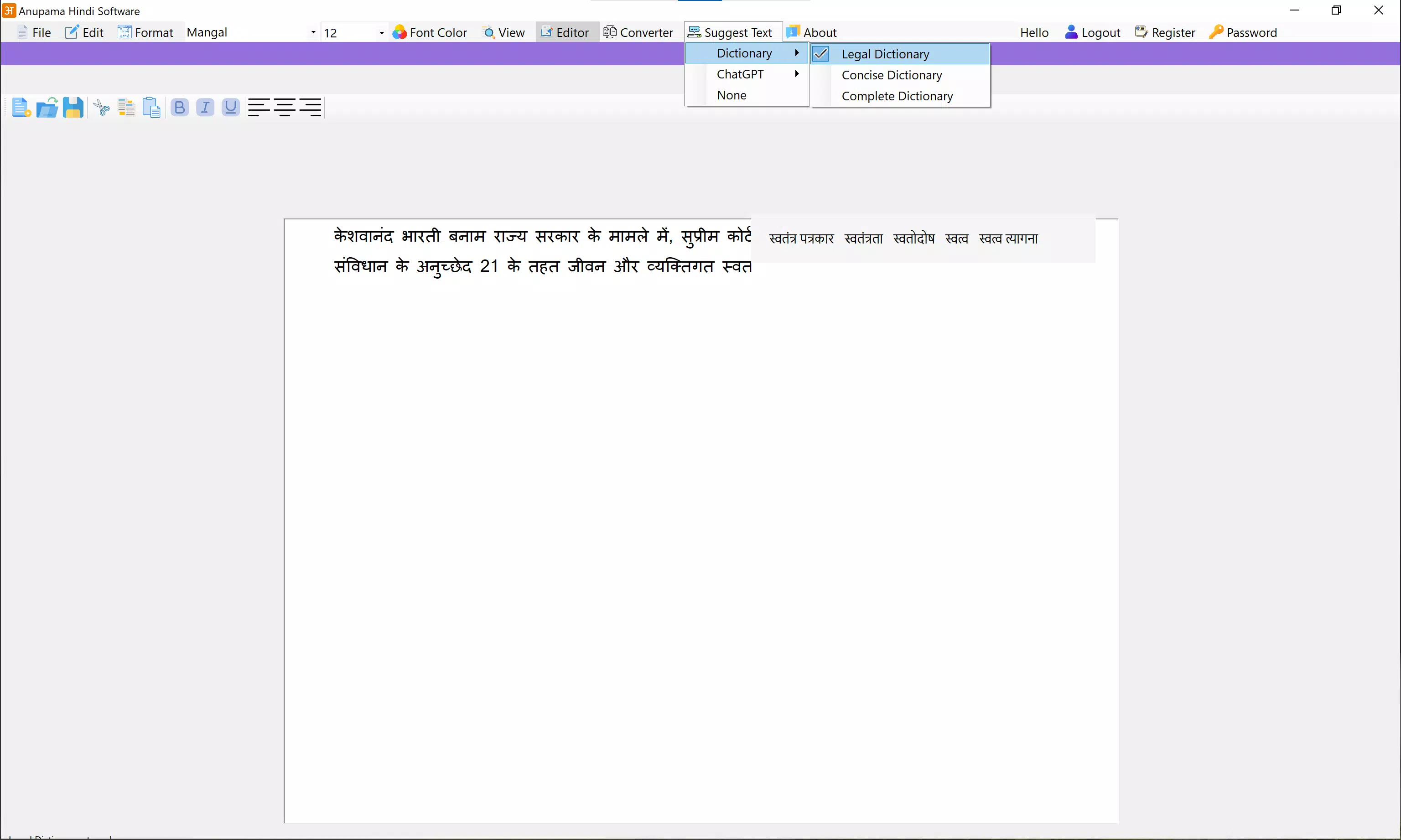
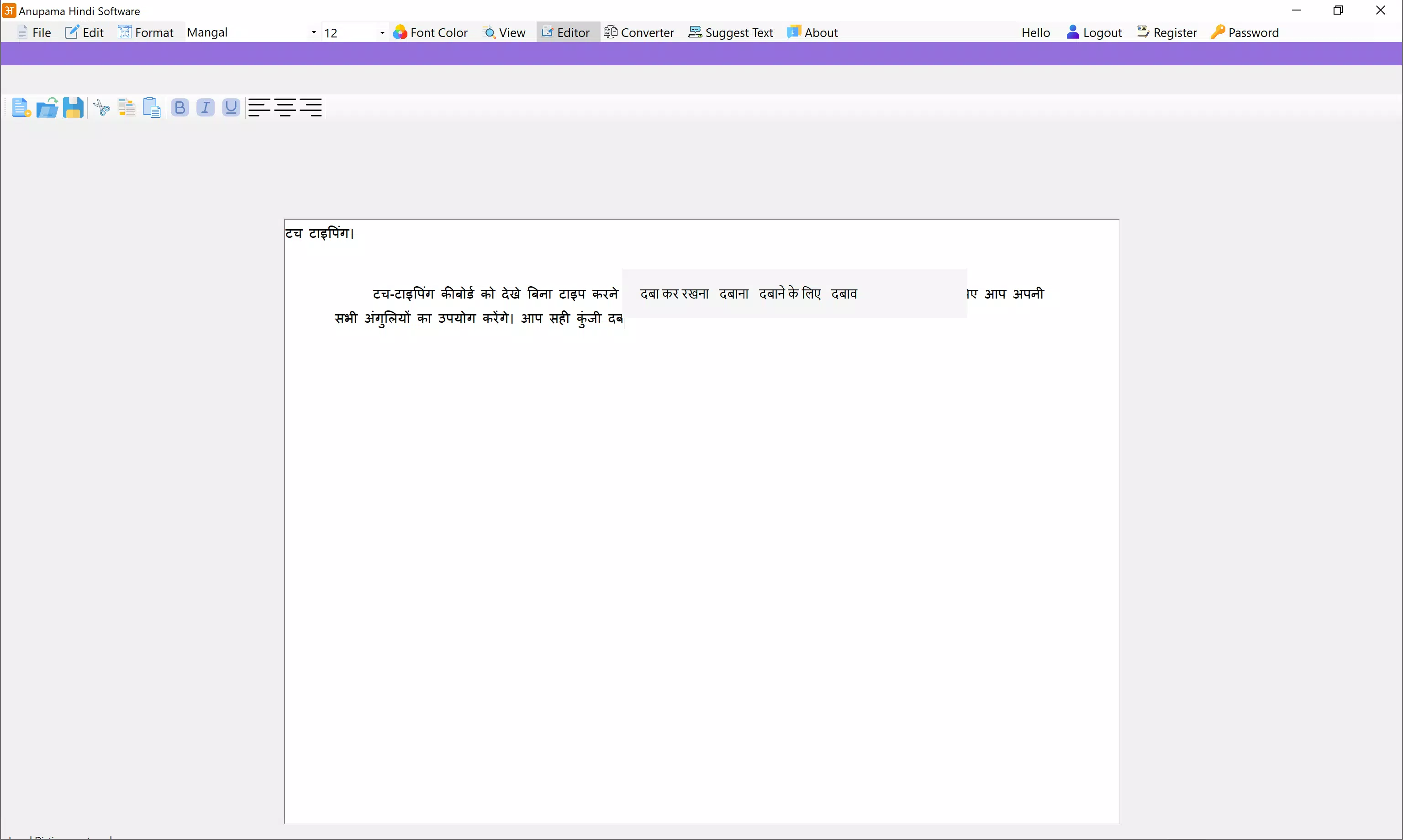
- AI-Powered Auto-Complete: Utilizing advanced AI technology, the software delivers intelligent text suggestions in real time. This feature minimizes typing effort and reduces errors, particularly beneficial for long-form Hindi writing. For example, legal professionals can rapidly draft clauses with context-aware completions.
- Comprehensive Dictionaries: The inclusion of a specialized legal dictionary ensures accurate terminology selection. This is critical in professional contexts where precision matters. Users can also expand their vocabulary with support for regional and formal Hindi terms.
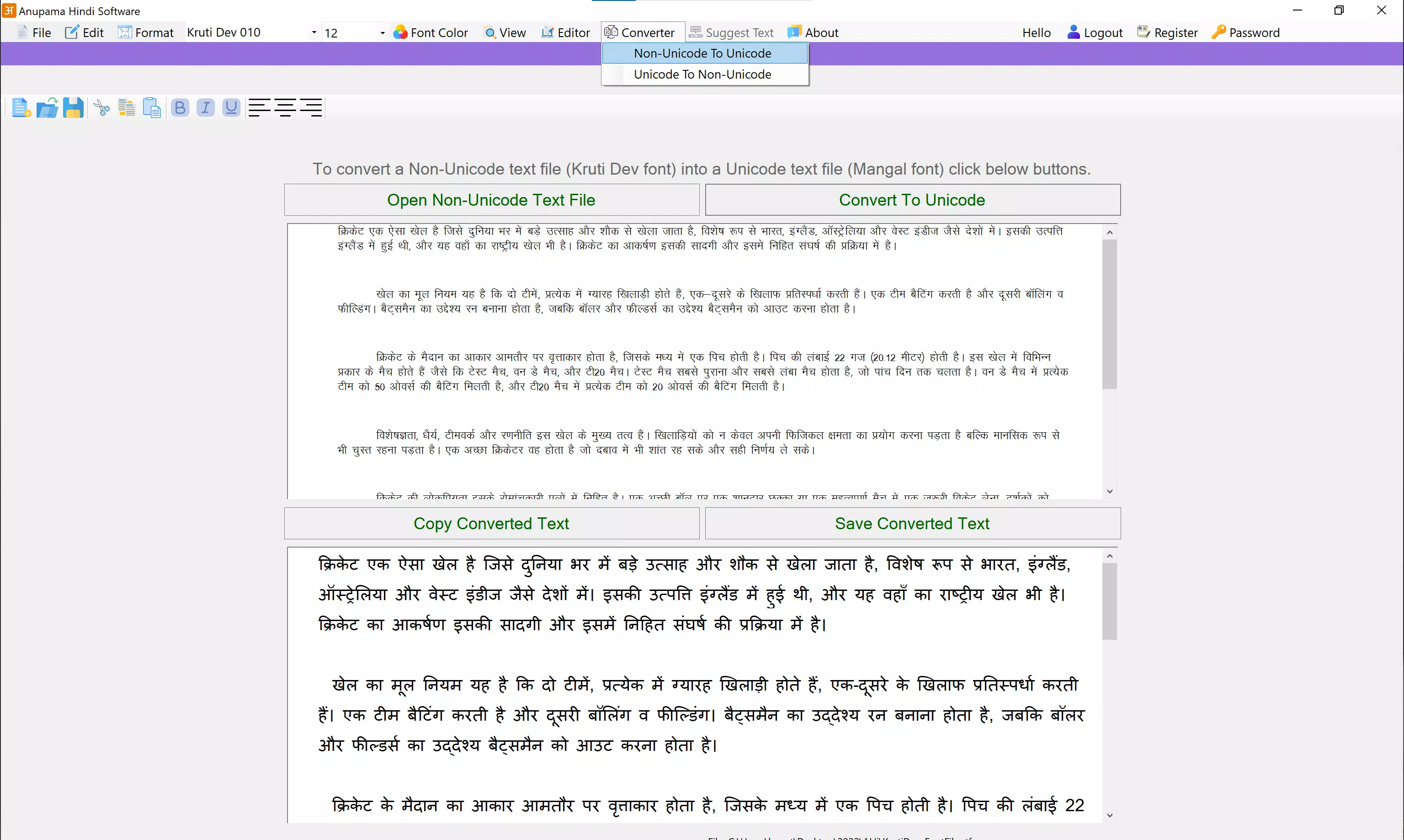
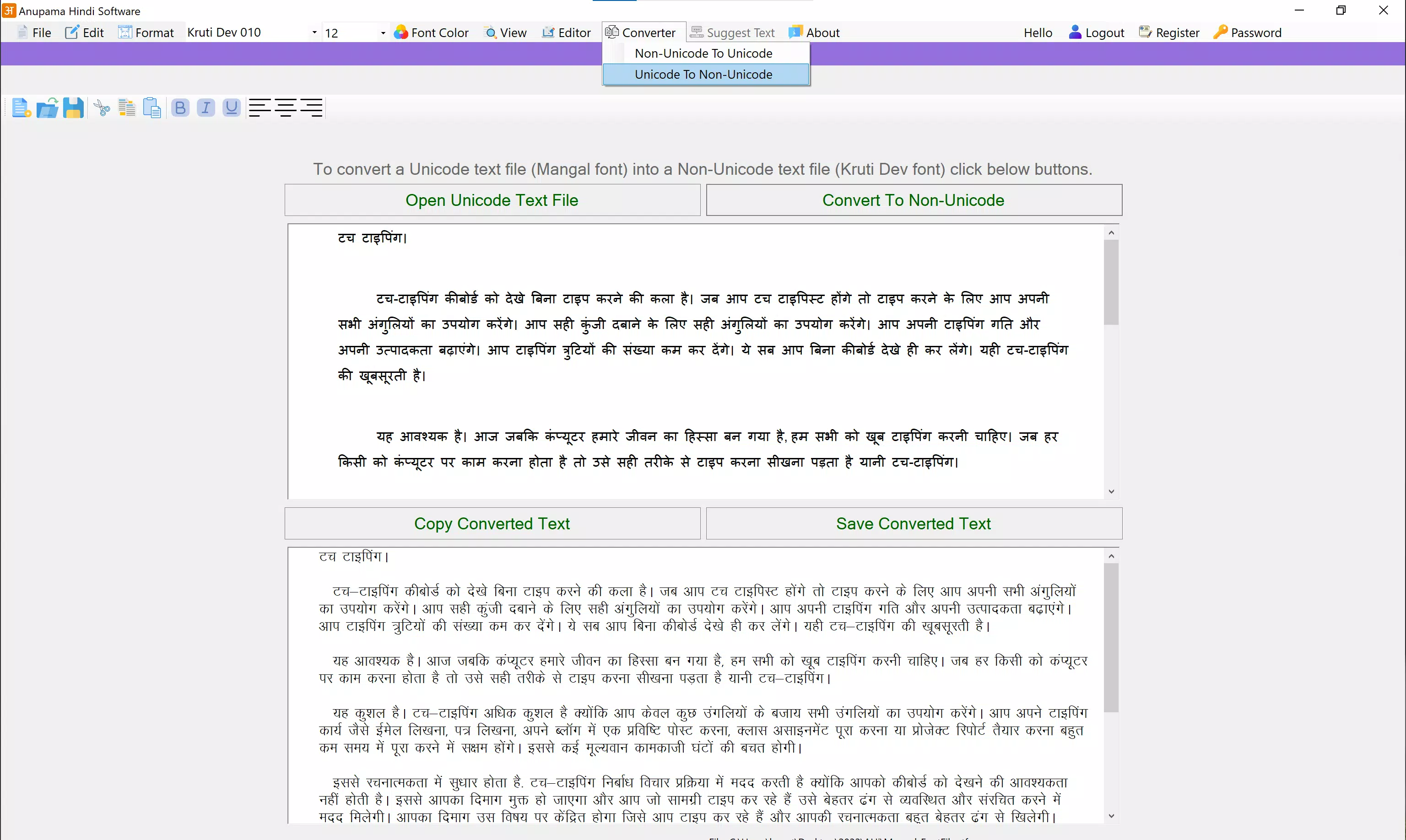
- Font Conversion: The built-in capability to convert between Non-Unicode fonts like Kruti Dev and Unicode (Mangal) enables seamless document migration. This is essential for users managing older Hindi files or collaborating across platforms with different font standards.
- User-Friendly Interface: Designed with intuitive navigation, the interface allows new users to adapt quickly. Even those unfamiliar with Hindi typing tools can begin using the software without extensive training, reducing the learning curve.
- Productivity Enhancement: By combining AI suggestions, dictionary support, and font flexibility, the software streamlines the writing process. Users can focus on content creation rather than technical formatting or correction, significantly improving workflow efficiency.
Interface, UX & Performance
The interface of Anupama Hindi Software reflects a clean, functional design focused on usability. Navigation is structured around core typing and editing functions, with clearly labeled tools and accessible menus. The layout prioritizes efficiency, allowing users to switch between features like dictionary lookup and font conversion without disrupting their workflow. Visual elements are minimal yet effective, reducing distractions and maintaining focus on text input.
Although the developer did not list formal performance metrics, the application’s reliance on the .NET 8.0 framework suggests optimized resource usage and stability. The software is expected to run smoothly on modern Windows systems, with responsive interactions and minimal lag during typing or conversion tasks. Compatibility across different device categories is not fully disclosed, but the application is designed for desktop environments, indicating consistent performance on standard Windows PCs. The stability of the interface, combined with intuitive controls, supports a seamless user experience, especially for extended writing sessions.
Platform Compatibility & Technical Requirements
Anupama Hindi Software is available exclusively for the Windows platform. The application requires the .NET 8.0 framework to operate, which is a modern runtime environment supporting high-performance applications. The software has a file size of 25.4 MB, indicating a lightweight installation that does not burden system resources. The current version is 2.0, suggesting a mature release with established functionality.
The developer did not specify minimum OS requirements or compatibility details for older Windows versions. As such, users should ensure their system supports .NET 8.0 before installation. Specific requirements were not listed, so compatibility with legacy systems cannot be confirmed. For users on Windows 10 or 11, the software is expected to function as intended, provided the necessary runtime is installed.
Pros and Cons
Pros
- AI-powered auto-complete enhances typing speed and accuracy
- Specialized legal dictionary improves professional document quality
- Seamless font conversion between Kruti Dev and Unicode (Mangal)
- Intuitive interface suitable for users of all skill levels
- Lightweight installation at 25.4 MB
Cons
- Platform limited to Windows only
- Requires .NET 8.0 framework, which may need separate installation
- Price point of $29.99 may be high for casual users
- Developer did not provide detailed system compatibility information
- No mobile or cross-platform availability confirmed
FAQ
Is Anupama Hindi Software available for Android or iOS?
The developer did not disclose mobile platform availability. The software is currently designed for Windows systems only.
Does the software require an internet connection?
The application uses AI for auto-completion, but the developer did not specify whether it operates offline or requires connectivity. It may function with or without internet access.
Can I use Anupama Hindi Software for free?
The software is priced at $29.99. No free version or trial was mentioned in the provided information.
How do I install the .NET 8.0 framework?
The developer did not provide instructions for installing the required runtime. Users may need to download it from the official Microsoft website.
Is the legal dictionary regularly updated?
Specific update frequency for the dictionary was not disclosed. Users should check the official source for the latest version details.
Final Thoughts
Anupama Hindi Software stands out as a powerful, professional-grade tool for Hindi text creation. Its combination of AI-driven typing assistance, a specialized legal dictionary, and seamless font conversion makes it ideal for users who demand accuracy and efficiency. While the Windows-only availability and price point may limit accessibility, the software delivers strong value for professionals in legal, academic, and administrative fields. The clean interface and lightweight design further enhance its appeal. For anyone serious about high-quality Hindi writing, this tool offers a reliable, modern solution.
Download Anupama Hindi Software now


